Static Object Detection
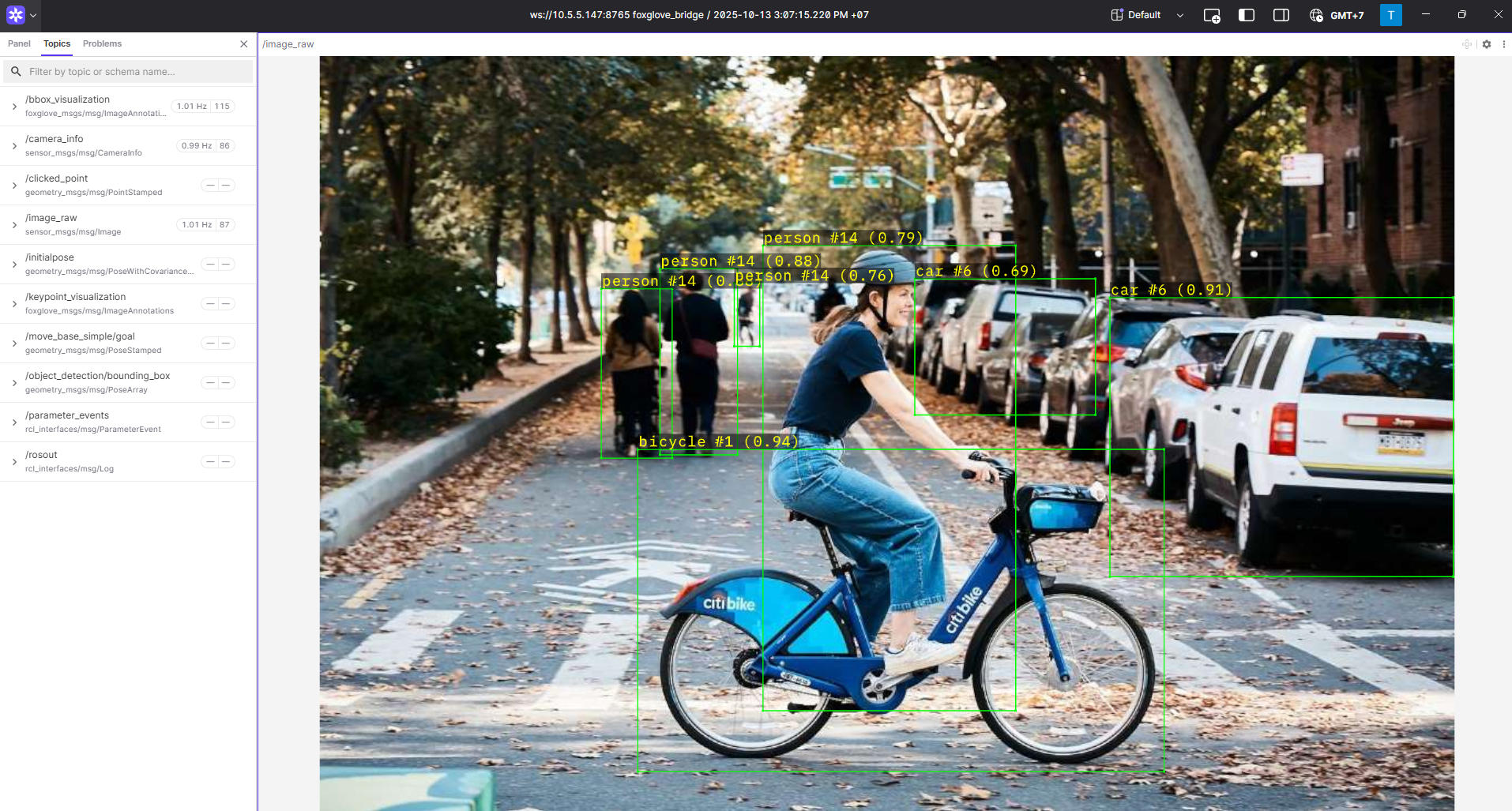
Static Object Detection Demo
The RZ/V Static Object Detection package provides the following features:
Demonstrates the usage of the AI library (DRP-AI) wrapped in a ROS 2 node.
Supports the YOLOX Pascal VOC model (20 classes) for static object detection.
Supports multi-threaded processing.
Supports visualization through Foxglove Studio.
Quick hardware setup instructions
Complete the Prerequisites for Running Sample Applications.
Quick software setup instructions
Note
All subsequent operations must be executed inside the cross-compilation Docker container, which was set up in the common setup step.
Clone the required source from GitHub by using the
vcstool inside the Docker container.Get the
ros2_demo_workspacerepository first:cd ~/ros2_ws git clone https://github.com/renesas-rdk/ros2_demo_workspace.git
Import the repositories by using the
vcscommand:vcs import < ./ros2_demo_workspace/vcs_manifests/rz-v2h/static_object_detection.target.lock.repos
It will clone all required repositories to the
./srcfolder.Cross-compile the ROS 2 workspace and deploy it to the RZ/V2H RDK board.
Update the APT repository list in the target sysroot.
arm64-chroot apt update
Install the dependencies to the target board first:
sysroot-rosdep-install
It will take time if you run this command for the first time.
Cross-build the application:
cross-colcon-build
Deploy the binaries to the target board:
scp -r install ubuntu@board_ip:~/ros2_ws/
Note
Replace
board_ipwith the actual IP address of your board. Ensure that theros2_wsdirectory exists at/home/ubuntuon the target board before running thescpcommand.
Start the application
Install the required dependencies on the RZ/V2H RDK board.
cd /home/ubuntu/ros2_ws
source /opt/ros/jazzy/setup.bash
rosdep install --from-paths ./install/*/share -y -r --ignore-src
The
/home/ubuntu/ros2_wsdirectory is the location where you copied the cross-compiled workspace on the board.Launch the Object Detection application.
Load the workspace environment:
source /opt/ros/jazzy/setup.bash
source ./install/setup.bash
For static object detection, use:
# Pascal VOC object detection on static image
ros2 launch rzv_object_detection static_object_detection_yolox.launch.py

# Hand detection on static image using YOLOX
ros2 launch rzv_object_detection static_hand_detection_yolox.launch.py

# Hand detection on static image using Gold YOLO
ros2 launch rzv_object_detection static_hand_detection_gold_yolo.launch.py
For visualization using Foxglove Studio, refer to the Foxglove Visualization section for setup instructions.
The input layout file for Foxglove Studio is located at
rzv_object_detection/config/foxglove/objects_detection.jsoninside the ROS 2 workspace.
For more details about the Static Object Detection application, refer to the README.md in the rzv_object_detection package.
v1.0.0 (2026-03-31): Initial release of the Static Object Detection sample application.