Rock Paper Scissors
Note
Available for Foxglove simulation environment without real robotic hardware!
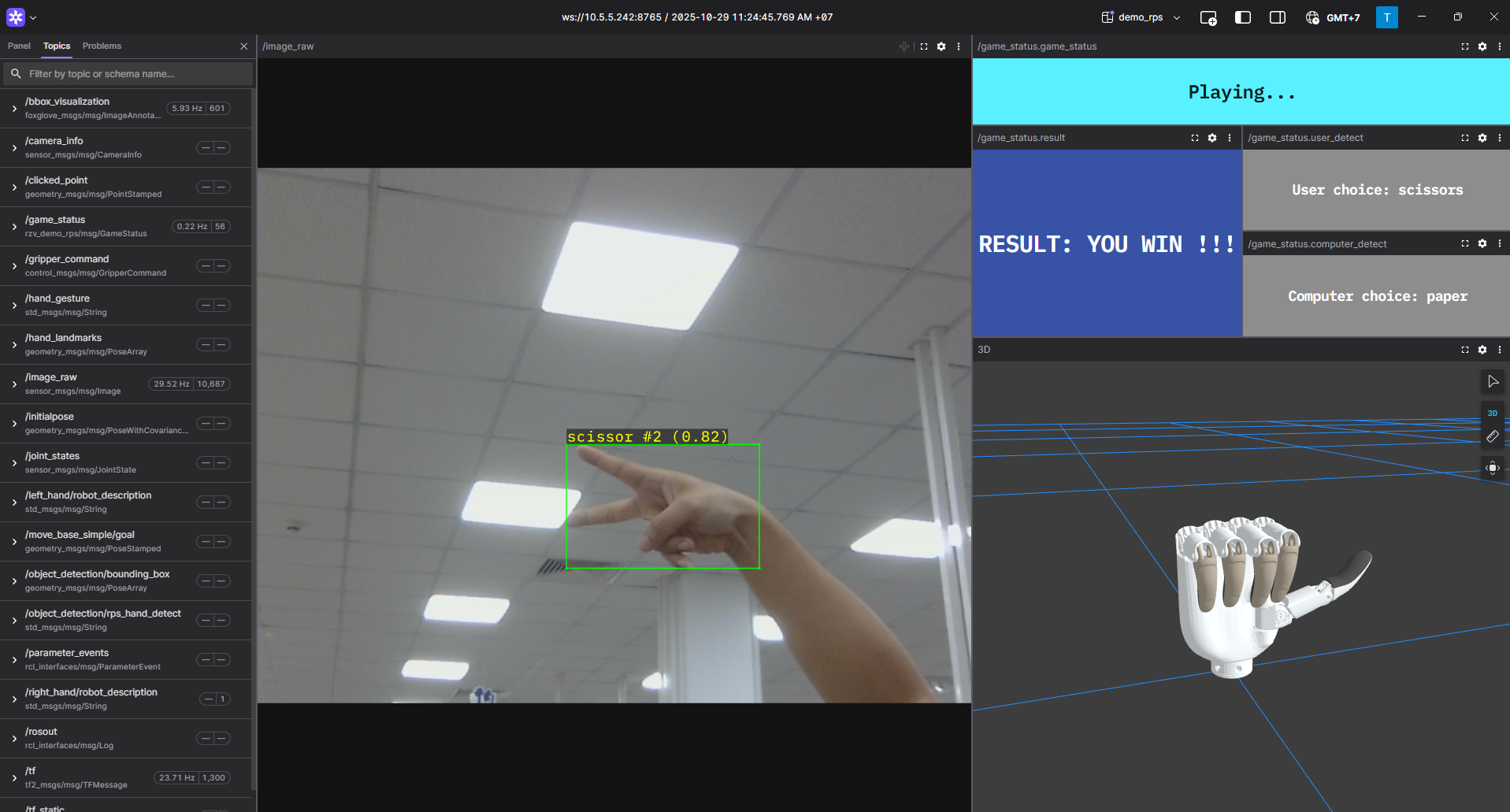
Rock Paper Scissors Demo
The renesas_demo_rps (Rock Paper Scissors) package provides the following features:
Rock-Paper-Scissors controller: detects rock, paper, and scissors gestures in real time, executes the game logic, and sends commands to control the robotic hand accordingly.
Compatible with the Inspire RH56, Inspire RH56E2, and Ruiyan RH2 robotic hands.
Supports RPS object detection and interpretation.
Supports simultaneous control of virtual and physical dexterous hands.
Supports a low-latency always-win mode with a selectable detector.
Supports visualization through Foxglove Studio.
Supports publishing a compressed H.264 video stream for low-bandwidth Foxglove viewing.
Quick hardware setup instructions
Complete the Prerequisites for Running Sample Applications.
Optional: Connect the dexterous hand to the RZ/V2H RDK board if you want to control the real hand.
Note
Before using the Ruiyan RH2 Dexhand, ensure that the hand is properly initialized using the provided setup script located in
ruiyan_rh2_hand_bringup/setup/ruiyan_rh2_init.shor ininstall/ruiyan_rh2_hand_bringup/share/ruiyan_rh2_hand_bringup/setup/ruiyan_rh2_init.shafter installation.Connect a compatible USB camera to the RZ/V2H RDK board for Rock Paper Scissors gesture detection.
Quick software setup instructions
Note
All subsequent operations must be executed inside the cross-compilation Docker container, which was set up in the common setup step.
Clone the required source from GitHub by using the
vcstool inside the Docker container.Get the
ros2_demo_workspacerepository first:cd ~/ros2_ws git clone https://github.com/renesas-rdk/ros2_demo_workspace.git
Import the repositories by using the
vcscommand:vcs import < ./ros2_demo_workspace/vcs_manifests/rz-v2h/rock_paper_scissors.target.lock.repos
It will clone all required repositories to the
./srcfolder.Cross-compile the ROS 2 workspace.
Update the APT repository list in the target sysroot.
arm64-chroot apt update
Install the dependencies to the target board first:
sysroot-rosdep-install
It will take time if you run this command for the first time.
Cross-build the application:
cross-colcon-build --packages-up-to renesas_demo_rps
Deploy the result to the board and install the runtime dependencies there, as described in Deploying and Installing Dependencies.
Start the application
Application rules:
Similar to the traditional game.
The user initiates a game by showing the “HI” pose (scissors gesture) in front of the camera.
The robotic hand performs a 1-2-3 countdown to signal the start of the round.
When the countdown is finished, the player must show a chosen gesture (rock, paper, or scissors) within 2 seconds. If no gesture is detected within this time, the game is aborted.
After the player gives a choice, the robotic hand randomly selects and displays rock, paper, or scissors.
The game result is then displayed by the robotic hand using the following gestures: OK for a draw, thumbs up when the player wins, and victory when the player loses.
Wait 2 seconds after the result is shown before starting a new game.
In always-win mode the robotic hand skips the random choice and immediately answers with the gesture that beats the detected player pose:
paperbeatsrock,scissorbeatspaper, androckbeatsscissor. The controller publishes theALWAYS_WINstatus on/game_status.Load the workspace environment on the RZ/V2H RDK board.
cd /home/ubuntu/ros2_ws
source /opt/ros/jazzy/setup.bash
source ./install/setup.bash
Launch the Rock Paper Scissors application.
To launch the virtual hands demo (without requiring hand hardware):
# For Inspire RH56 hand
ros2 launch renesas_demo_rps demo_inspire_rh56_hand_rps.launch.py use_mock_hardware:=true

# For Inspire RH56 hand + low-latency always win mode
ros2 launch renesas_demo_rps demo_inspire_rh56_hand_rps_always_win.launch.py use_mock_hardware:=true

# For Inspire RH56E2 hand
ros2 launch renesas_demo_rps demo_inspire_rh56e2_hand_rps.launch.py use_mock_hardware:=true

# For Inspire RH56E2 hand + low-latency always win mode
ros2 launch renesas_demo_rps demo_inspire_rh56e2_hand_rps_always_win.launch.py use_mock_hardware:=true

# For Ruiyan RH2 hand
ros2 launch renesas_demo_rps demo_ruiyan_rh2_hand_rps.launch.py use_mock_hardware:=true

# For Ruiyan RH2 hand + low-latency always win mode
ros2 launch renesas_demo_rps demo_ruiyan_rh2_hand_rps_always_win.launch.py use_mock_hardware:=true
To launch the physical Inspire RH56 hand control demo:
ros2 launch renesas_demo_rps demo_inspire_rh56_hand_rps.launch.py use_mock_hardware:=false video_device:=/dev/video0 serial_port:=/dev/ttyUSB0
To launch the low-latency always-win Inspire RH56 demo:
# With YOLOX (default)
ros2 launch renesas_demo_rps demo_inspire_rh56_hand_rps_always_win.launch.py use_mock_hardware:=false video_device:=/dev/video0 serial_port:=/dev/ttyUSB0

# With YOLOv8
ros2 launch renesas_demo_rps demo_inspire_rh56_hand_rps_always_win.launch.py use_mock_hardware:=false video_device:=/dev/video0 serial_port:=/dev/ttyUSB0 detector:=yolov8
To launch the physical Inspire RH56E2 hand control demo:
ros2 launch renesas_demo_rps demo_inspire_rh56e2_hand_rps.launch.py use_mock_hardware:=false video_device:=/dev/video0 serial_port:=/dev/ttyUSB0
To launch the low-latency always-win Inspire RH56E2 demo:
# With YOLOX (default)
ros2 launch renesas_demo_rps demo_inspire_rh56e2_hand_rps_always_win.launch.py use_mock_hardware:=false video_device:=/dev/video0 serial_port:=/dev/ttyUSB0

# With YOLOv8
ros2 launch renesas_demo_rps demo_inspire_rh56e2_hand_rps_always_win.launch.py use_mock_hardware:=false video_device:=/dev/video0 serial_port:=/dev/ttyUSB0 detector:=yolov8
To launch the low-latency always-win Inspire RH56E2 demo with compressed video streaming:
# With YOLOX (default)
ros2 launch renesas_demo_rps demo_inspire_rh56e2_hand_rps_always_win_r365.launch.py use_mock_hardware:=false video_device:=/dev/video0 serial_port:=/dev/ttyUSB0 enable_whip:=false

# With YOLOv8
ros2 launch renesas_demo_rps demo_inspire_rh56e2_hand_rps_always_win_r365.launch.py use_mock_hardware:=false video_device:=/dev/video0 serial_port:=/dev/ttyUSB0 detector:=yolov8 enable_whip:=false
This launch file keeps the same always-win control path and publishes the overlaid camera feed as a compressed H.264 stream on
/hand_camera/compressed_video, which the Foxglove layout reads instead of the raw image topic. Encoding happens on the hardware encoder, so the board sends far less data to Foxglove than a raw stream.Important
Pass
enable_whip:=false. The launch file otherwise also tries to push the encoded stream to a network uplink that is not part of the RDK.To launch the physical RuiYan RH2 hand control demo:
ros2 launch renesas_demo_rps demo_ruiyan_rh2_hand_rps.launch.py use_mock_hardware:=false video_device:=/dev/video0 can_interface:=can2
To launch the low-latency always-win RuiYan RH2 demo:
# With YOLOX (default)
ros2 launch renesas_demo_rps demo_ruiyan_rh2_hand_rps_always_win.launch.py use_mock_hardware:=false video_device:=/dev/video0 can_interface:=can2

# With YOLOv8
ros2 launch renesas_demo_rps demo_ruiyan_rh2_hand_rps_always_win.launch.py use_mock_hardware:=false video_device:=/dev/video0 can_interface:=can2 detector:=yolov8
For simulation using Foxglove Studio, refer to the Foxglove Visualization section for setup instructions.
The input layout file for Foxglove Studio is located at
renesas_demo_rps/config/foxglove/demo_rps.jsoninside the ROS 2 workspace.For always-win mode, the input layout file is located at
renesas_demo_rps/config/foxglove/demo_rps_always_win.json.For the compressed-video always-win launch file, import
renesas_demo_rps/config/foxglove/demo_rps_always_win_r365.jsoninstead. It uses/hand_camera/compressed_videofor the camera panel.
Selecting the detector
The detector argument exists only in the always-win launch files. The plain demo_*_rps
launch files are fixed to YOLOv8.
|
Executable ( |
Model type |
|---|---|---|
|
|
|
|
|
|
Launch arguments
The following table lists the launch arguments accepted by the demo launch files:
Argument |
Meaning |
Default |
|---|---|---|
|
Camera device node used for gesture detection. |
|
|
Serial port of the physical Inspire RH56 or RH56E2 hand. |
|
|
CAN interface of the physical Ruiyan RH2 hand. |
|
|
Target motor speed for all joints, 0 to 1000. |
|
|
Which hand to control, |
|
|
Set to |
|
|
AI detector used by the always-win launch files, |
|
The arguments below exist only in the compressed-video launch file,
demo_inspire_rh56e2_hand_rps_always_win_r365.launch.py:
Argument |
Meaning |
Default |
|---|---|---|
|
Reliability of the camera publisher. |
|
|
Network uplink for the encoded stream. Set it to |
|
|
Topic carrying the encoded H.264 stream as |
|
|
H.264 encoder target bitrate, in bits per second. |
|
|
Target camera capture frame rate. |
|
|
Input frame-rate limiter applied before encoding. |
|
|
Maximum age of an annotation still drawn on the overlay, in milliseconds. |
|
|
Enable anti-aliasing when rendering the overlay. |
|
|
Render annotation text on the overlay. |
|
For more details about the Rock Paper Scissors application, refer to the README.md in the renesas_demo_rps package.
v1.0.0 (2026-03-31): Initial release of the Rock Paper Scissors sample application.
v1.1.0 (2026-05-31): Added support for the RH56E2 Dexhand, always win mode, and ported the application to
ros2_controlframework for improved performance and flexibility.v1.2.0 (2026-09-10): Added the compressed-video streaming launch file and moved the package to a build-time platform selection.