Vision Based Dexterous Hand
Note
Available for Foxglove simulation environment without real robotic hardware!
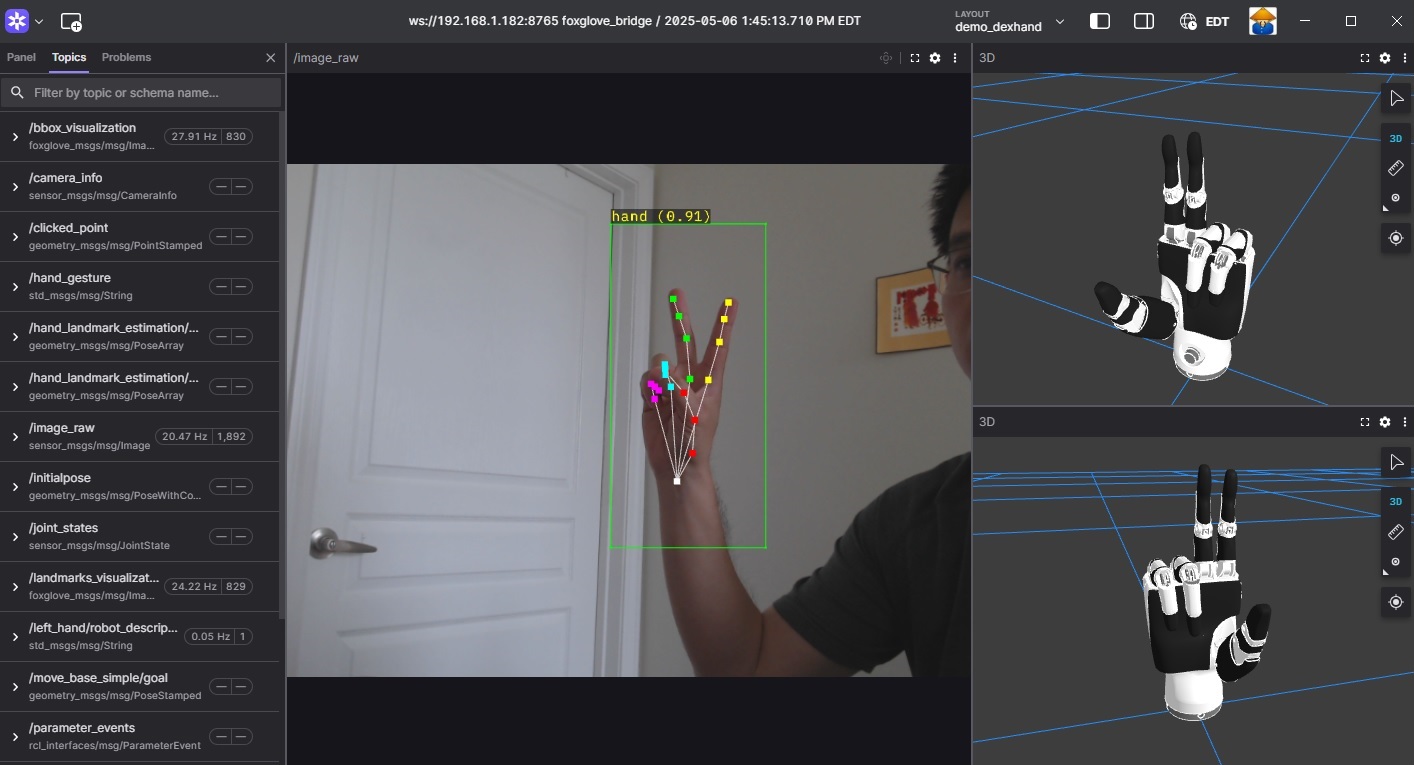
Dexterous Hand Demo
The renesas_demo_dexhand package provides the following features:
Supports hand landmark estimation and interpretation.
Supports simultaneous control of virtual and physical dexterous hands.
Supports visualization through Foxglove Studio.
Supports multiple dexterous hand models: Inspire RH56, Inspire RH56E2, and Ruiyan RH2.
Supports running two AI models simultaneously on the DRP-AI IP: one for hand detection and another for hand landmark estimation.
Supports multiple AI models for both hand detection and hand landmark estimation.
Quick hardware setup instructions
Complete the Prerequisites for Running Sample Applications.
Optional: Connect the dexterous hand to the RZ/V2H RDK board if you want to control the real hand.
Note
Before using the Ruiyan RH2 Dexhand, ensure that the hand is properly initialized using the provided setup script located in
ruiyan_rh2_hand_bringup/setup/ruiyan_rh2_init.shor ininstall/ruiyan_rh2_hand_bringup/share/ruiyan_rh2_hand_bringup/setup/ruiyan_rh2_init.shafter installation.Connect a compatible USB camera to the RZ/V2H RDK board for hand detection and landmark estimation.
Quick software setup instructions
Note
All subsequent operations must be executed inside the cross-compilation Docker container, which was set up in the common setup step.
Clone the required source from GitHub by using the
vcstool inside the Docker container.Get the
ros2_demo_workspacerepository first:cd ~/ros2_ws git clone https://github.com/renesas-rdk/ros2_demo_workspace.git
Import the repositories by using the
vcscommand:vcs import < ./ros2_demo_workspace/vcs_manifests/rz-v2h/vision_based_dexterous_hand.target.lock.repos
It will clone all required repositories to the
./srcfolder.Cross-compile the ROS 2 workspace.
Update the APT repository list in the target sysroot.
arm64-chroot apt update
Install the dependencies to the target board first:
sysroot-rosdep-install
It will take time if you run this command for the first time.
Cross-build the application:
cross-colcon-build --packages-up-to renesas_demo_dexhand
Deploy the result to the board and install the runtime dependencies there, as described in Deploying and Installing Dependencies.
Start the application
Load the workspace environment on the RZ/V2H RDK board.
cd /home/ubuntu/ros2_ws
source /opt/ros/jazzy/setup.bash
source ./install/setup.bash
Launch the Vision Based Dexterous Hand application.
For virtual hand control (without a real dexterous hand), use:
# For Inspire RH56 hand
ros2 launch renesas_demo_dexhand demo_inspire_rh56_hand.launch.py use_mock_hardware:=true

# For Inspire RH56E2 hand
ros2 launch renesas_demo_dexhand demo_inspire_rh56e2_hand.launch.py use_mock_hardware:=true

# For Ruiyan RH2 hand
ros2 launch renesas_demo_dexhand demo_ruiyan_rh2_hand.launch.py use_mock_hardware:=true
For real dexterous hand control, use:
# For Inspire RH56 hand
ros2 launch renesas_demo_dexhand demo_inspire_rh56_hand.launch.py use_mock_hardware:=false video_device:=/dev/video0 serial_port:=/dev/ttyUSB0

# For Inspire RH56E2 hand
ros2 launch renesas_demo_dexhand demo_inspire_rh56e2_hand.launch.py use_mock_hardware:=false video_device:=/dev/video0 serial_port:=/dev/ttyUSB0

# For Ruiyan RH2 hand
ros2 launch renesas_demo_dexhand demo_ruiyan_rh2_hand.launch.py use_mock_hardware:=false video_device:=/dev/video0 can_interface:=can2
Based on the hand gesture shown in front of the camera, the dexterous hand mimics the observed hand movement.
Note
The common setup uses a fixed USB camera placed in front of the user and pointing upward toward the hand. The camera captures the palm from below, so the hand appears from bottom to top in the image, the wrist is at the bottom, and the fingers point upward.
When the hand is positioned correctly within the camera view, the robot hand mimics the gestures accurately. The robot hand interprets motion only along the vertical (bottom-to-top) direction.
Refer to the image above for the correct orientation between the camera and the user’s hand.
For simulation using Foxglove Studio, refer to the Foxglove Visualization section for setup instructions.
The input layout file for Foxglove Studio is located at
renesas_demo_dexhand/config/foxglove/demo_dexhand.jsoninside the ROS 2 workspace.
Launch arguments
The following table lists the launch arguments accepted by the demo launch files:
Argument |
Meaning |
Default |
|---|---|---|
|
Camera device node used for hand tracking. |
|
|
Hand landmark model to use. Other values are |
|
|
Serial port of the physical Inspire RH56 or RH56E2 hand. |
|
|
CAN interface of the physical Ruiyan RH2 hand. |
|
|
Target motor speed for all joints, 0 to 1000. |
|
|
Which hand to control, |
|
|
Set to |
|
For more details about the Vision Based Dexterous Hand application, refer to the README.md in the renesas_demo_dexhand package.
v1.0.0 (2026-03-31): Initial release of the Vision Based Dexterous Hand sample application.
v1.1.0 (2026-05-31): Added support for the RH56E2 Dexhand and ported the application to
ros2_controlframework for improved performance and flexibility.v1.2.0 (2026-09-10): Moved the package to a build-time platform selection.