Static / Camera-based Hand Landmark Estimation
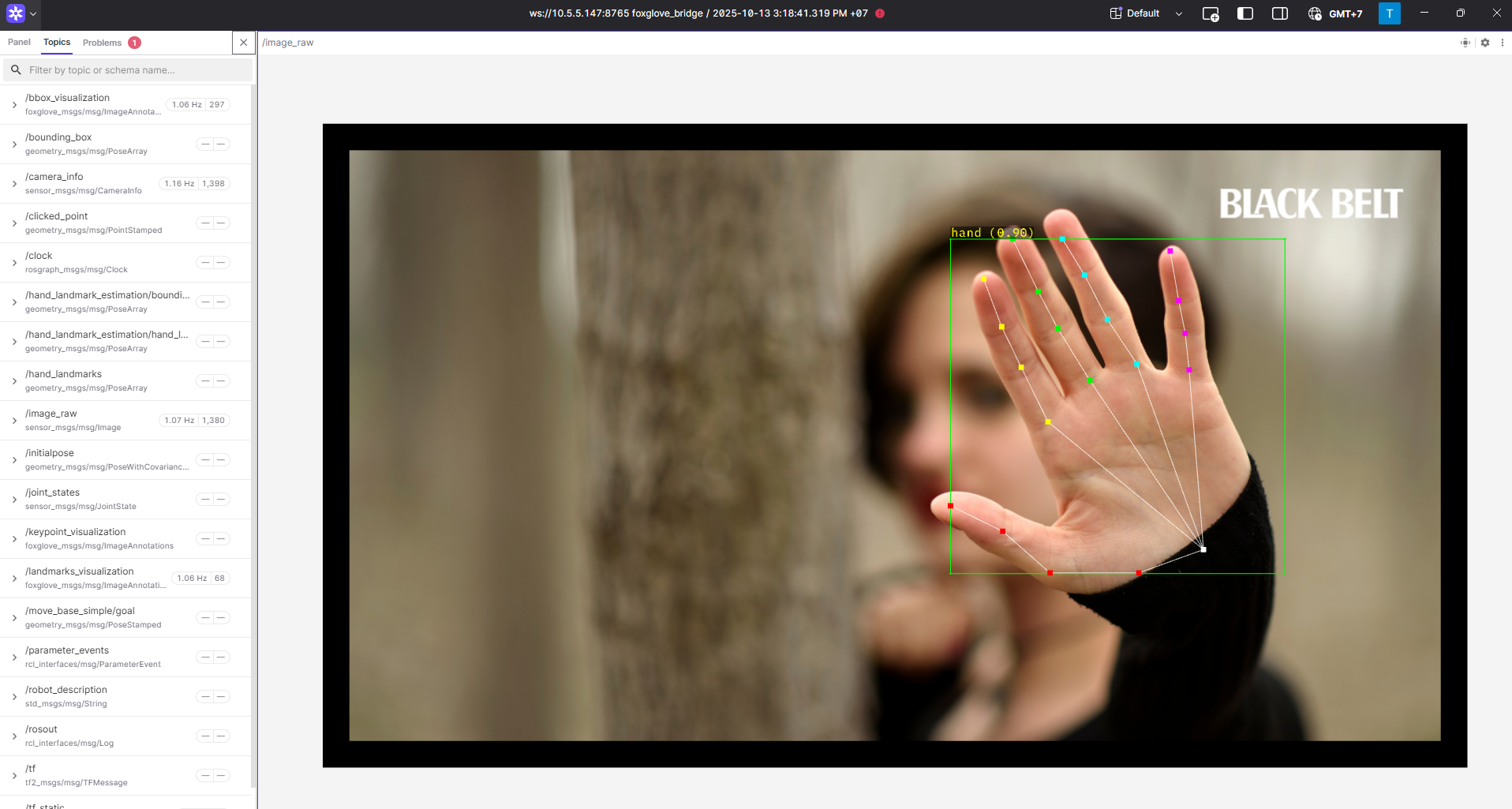
Hand Landmark Demo
The RZ/V Pose Estimation package provides the following features:
Demonstrates the usage of the AI library (DRP-AI) wrapped in a ROS 2 node.
Supports hand detection and landmark estimation.
Supports real-time camera-based estimation.
Supports static image-based estimation.
Supports smooth landmark tracking.
Supports a two-stage pipeline: hand detection using YOLOX models, followed by landmark estimation using various models.
Supports multiple landmark models:
MediaPipe Hand Landmark model
HRNetV2 Hand Landmark model
RTMPose Hand model
Supports EMA-based landmark smoothing.
Integrates with Foxglove Studio for visualization.
Supports multi-threaded processing.
Quick hardware setup instructions
Complete the Prerequisites for Running Sample Applications.
Optional: Connect a compatible USB camera to the RZ/V2H RDK board for hand detection and landmark estimation.
Quick software setup instructions
Note
All subsequent operations must be executed inside the cross-compilation Docker container, which was set up in the common setup step.
Clone the required source from GitHub by using the
vcstool inside the Docker container.Get the
ros2_demo_workspacerepository first:cd ~/ros2_ws git clone https://github.com/renesas-rdk/ros2_demo_workspace.git
Import the repositories by using the
vcscommand:vcs import < ./ros2_demo_workspace/vcs_manifests/rz-v2h/hand_landmark_estimation.target.lock.repos
It will clone all required repositories to the
./srcfolder.Cross-compile the ROS 2 workspace.
Update the APT repository list in the target sysroot.
arm64-chroot apt update
Install the dependencies to the target board first:
sysroot-rosdep-install
It will take time if you run this command for the first time.
Cross-build the application:
cross-colcon-build --packages-up-to rzv_pose_estimation
Deploy the result to the board and install the runtime dependencies there, as described in Deploying and Installing Dependencies.
Start the application
Load the workspace environment on the RZ/V2H RDK board.
cd /home/ubuntu/ros2_ws
source /opt/ros/jazzy/setup.bash
source ./install/setup.bash
Launch the Static / Camera-based Hand Landmark Estimation application.
For hand landmark estimation on a static image, use:
ros2 launch rzv_pose_estimation static_hand_landmark_estimation.launch.py
For hand landmark estimation using camera input, use:
ros2 launch rzv_pose_estimation camera_hand_landmark_estimation.launch.py
For visualization using Foxglove Studio, refer to the Foxglove Visualization section for setup instructions.
The input layout file for Foxglove Studio is located at
rzv_pose_estimation/config/foxglove/landmark_estimation.jsoninside the ROS 2 workspace.
For more details about the Static / Camera-based Hand Landmark Estimation application, refer to the README.md in the rzv_pose_estimation package.
v1.0.0 (2026-03-31): Initial release of the Static / Camera-based Hand Landmark Estimation sample application.