Vision-Based Grasping
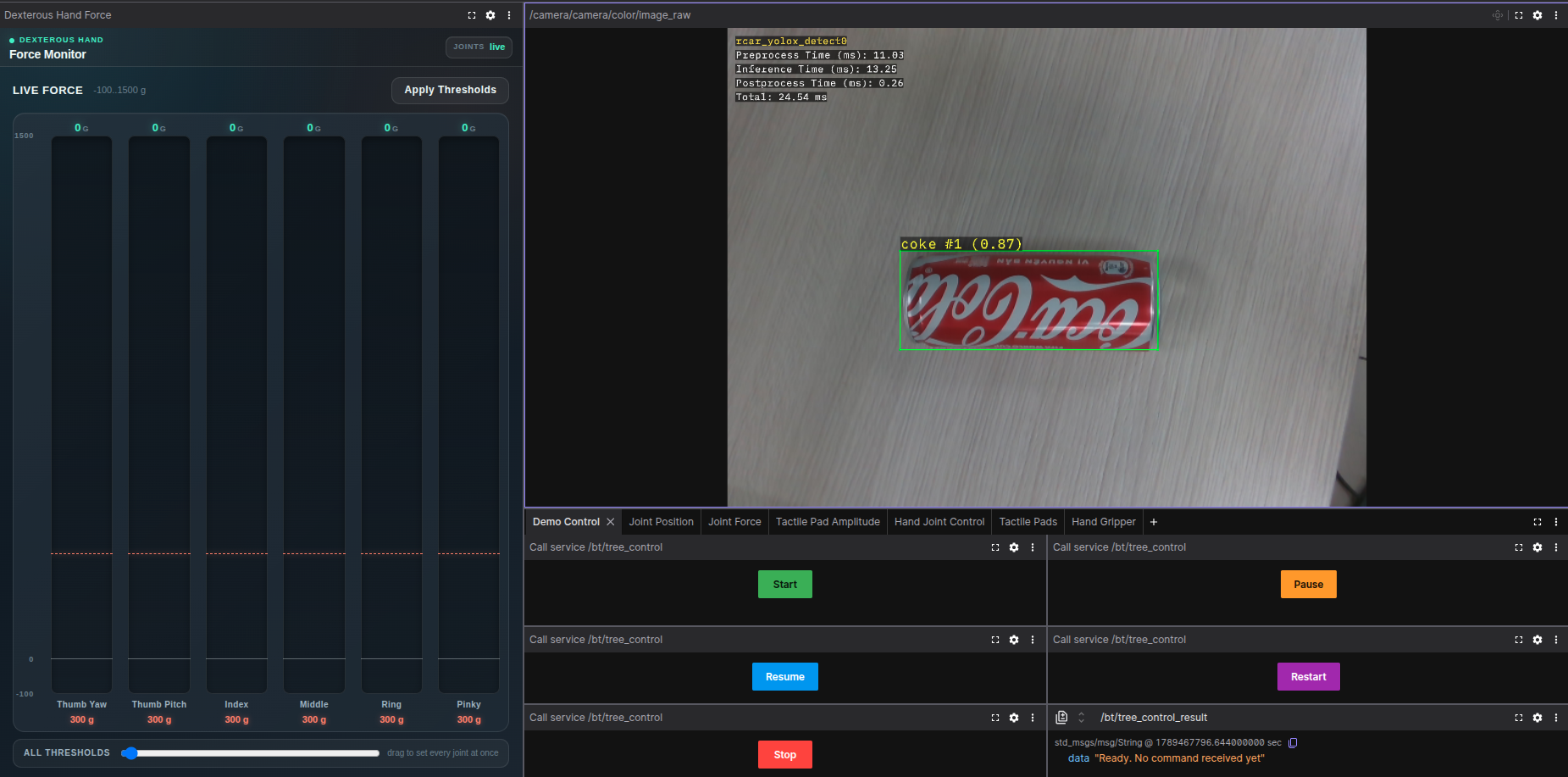
Vision-Based Grasping Demo
The renesas_vision_based_grasping package is the top-level launch and configuration package for the vision-based pick-and-place demo: an Agilex Piper arm with a dexterous hand picks objects detected by a RealSense camera and drops them in a bin, driven by a BehaviorTree.CPP mission.
On the R-Car V4H SH the detector is rcar_object_detection running a YOLOX soft-object model.
See Object Detection Applications for the detector itself.
The package wires together:
RealSense D4xx camera bringup through
realsense2_camera.YOLOX soft-object detection on the R-Car V4H SH.
3D object-pose extraction from the detections and the aligned depth image (
get_object_pose_server).Arm motion servers for pose moves, trajectory planning, and speed control.
Force-aware and position-only end-effector control servers.
The behavior-tree engine, the pick-place module plugin, and the mission tree.
A tree manager exposing start, pause, resume, restart, and stop control.
Foxglove visualization: bounding-box overlays and an inference-timing overlay.
The package contains no code of its own; its CMakeLists.txt installs launch/, config/,
and trees/ only.
Launch Files
The following table lists the launch files and what each one brings up:
Launch file |
Purpose |
|---|---|
|
RealSense camera, YOLOX detection through |
|
The execute-layer servers (end-effector, move-to-pose, arm speed, object pose, and trajectory planning), plus the tree manager and the behavior-tree engine. |
Behavior Tree
trees/MainTree.xml is the mission the behavior-tree engine loads. MainTree retries the
pick-and-place mission up to three times, then returns the arm home.
Hardware Setup
Note
This demo requires several 3D-printed parts. Download the STL files from the robot_printables GitHub repository and print them before starting.
Complete the Prerequisites for Running Sample Applications.
Connect an Intel RealSense D4xx depth camera to the R-Car V4H SH board.
Set up the Agilex Piper arm and the dexterous hand using the instructions in their bringup packages. The arm and a Ruiyan RH2 hand each attach through their own USB-to-CAN adapter; an Inspire hand attaches through a USB-to-serial adapter.
Place the objects to be picked within the camera’s field of view and the arm’s reach, and put the drop-off bin in reach as well.
Quick Software Setup Instructions
Note
Run every command below inside the cross-compilation Docker container set up in Prerequisites for Running Sample Applications.
Get the
ros2_demo_workspacerepository, which carries the manifest for each demo:cd ~/ros2_ws git clone https://github.com/renesas-rdk/ros2_demo_workspace.git
Import the repositories this demo needs with the
vcstool:vcs import < ./ros2_demo_workspace/vcs_manifests/rcar-v4h/vision_based_grasping.target.lock.repos
Every repository the demo needs is cloned into the
src/folder of the workspace, each pinned to the revision the manifest locks.Install the demo’s build dependencies into the target sysroot:
arm64-chroot apt update
sysroot-rosdep-install
Cross-compile the workspace.
renesas_vision_based_graspingis hardware-neutral, so its dependencies do not pull in an arm-and-hand assembly. Build the application together with the assembly you are going to run.For the Piper arm and an Inspire RH56E2 hand:
cross-colcon-build --packages-up-to \
  renesas_vision_based_grasping \
  piper_arm_inspire_rh56e2_hand_bringup
For the Piper arm and a Ruiyan RH2 hand:
cross-colcon-build --packages-up-to \
  renesas_vision_based_grasping \
  piper_arm_ruiyan_hand_bringup \
  ruiyan_rh2_hand_bringup
ruiyan_rh2_hand_bringupis listed on its own because it installs theruiyan_rh2_init.shscript that initializes the hand’s USB-to-CAN adapter.Deploy the result to the board and install the runtime dependencies there, as described in Deploying and Installing Dependencies.
Running the Demo
Source the workspace, then bring the stack up in this order, each part in its own terminal.
source /opt/ros/jazzy/setup.bash
source install/setup.bash
Bring up the robot. Launch the arm and the hand together, using the assembly you built.
For the Piper arm and an Inspire RH56E2 hand, which attaches through a USB-to-serial adapter:
ros2 launch piper_arm_inspire_rh56e2_hand_bringup \
  piper_arm_inspire_rh56e2_hand_joint_position.launch.py \
  use_mock_hardware:=false camera_mode:=eye_in_hand \
  arm_can_interface:=can2 arm_speed:=40 serial_port:=/dev/ttyUSB0
For the Piper arm and a Ruiyan RH2 hand, initialize the hand’s USB-to-CAN adapter once per power cycle first, then launch:
cd ~/ros2_ws
./install/ruiyan_rh2_hand_bringup/share/ruiyan_rh2_hand_bringup/setup/ruiyan_rh2_init.sh

ros2 launch piper_arm_ruiyan_hand_bringup \
  piper_arm_ruiyan_hand_joint_position.launch.py \
  use_mock_hardware:=false camera_mode:=eye_in_hand \
  arm_can_interface:=can2 arm_speed:=40 hand_can_interface:=can3
can2andcan3are the interfaces the USB-to-CAN adapters enumerate as, not the onboard CAN-FD header. With the adapters plugged in, runip link show | grep canto confirm which name belongs to the arm and which to the hand, and pass them accordingly. The launch asks for your password so it can bring up the arm’s CAN interface.Start the behavior layer. Match the end-effector mode to the hand you mounted:
# Inspire RH56E2: force-aware end-effector control, the default
ros2 launch renesas_vision_based_grasping behavior_bringup.launch.py

# Ruiyan RH2: plain position control
ros2 launch renesas_vision_based_grasping behavior_bringup.launch.py \
  eef_control_mode:=no_force
The launch accepts the following arguments:
Argument
Default
Description
eef_control_modeforceWhich end-effector server to launch for the mounted hand.
forceis the Inspire RH56E2 mode-1 force hold;no_forceis plain position control, used by the Ruiyan RH2.params_file-
Override path to a YAML parameter file. Empty uses
config/params.yamlfromrenesas_vision_based_grasping.Start perception.
ros2 launch renesas_vision_based_grasping perception_realsense_camera_rcar.launch.py
This starts the RealSense camera, the YOLOX detector with a confidence threshold of 0.4, the Foxglove bridge, and the overlay nodes. The only launch argument is
yolox_model_type, which defaults toyolox_soft, a model key in theconfig/models/models_config.yamlfile ofrcar_object_detection.The detection topics keep their
/yolox_soft_objects_detection/names, so the behavior layer works unchanged.Start the mission. Nothing moves until the tree manager activates the engine. Wait for the behavior-tree engine to report that it configured the stack:
[behavior_tree_engine_node-7] [INFO] [xx.xx] [bt_engine]: Configured stack: Vision-Based Grasping Stack
Then start the tree:
ros2 service call /bt/tree_control bt_interfaces/srv/TreeControl "{command: start}"
Note
The behavior-tree engine starts 10 seconds after the launch, so the servers advertise their
actions and services first, and the launch emits only the CONFIGURE lifecycle transition
about 2 seconds later. Configuring builds the tree from params.yaml but does not tick it.
ACTIVATE comes from the tree manager’s start command.
Controlling the Mission
tree_manager_node serves /bt/tree_control (bt_interfaces/srv/TreeControl) with the
commands start, pause, resume, restart, and stop, and drives the bt_engine
lifecycle node accordingly. It also publishes a latched std_msgs/Bool on /bt/tree_paused,
consumed by the tree’s PauseGate, and a latched result string on /bt/tree_control_result.
ros2 service call /bt/tree_control bt_interfaces/srv/TreeControl "{command: pause}"
ros2 service call /bt/tree_control bt_interfaces/srv/TreeControl "{command: resume}"
ros2 service call /bt/tree_control bt_interfaces/srv/TreeControl "{command: stop}"
Pause takes effect at the next pause gate; in-flight arm motion finishes first.