Vision-Based Dexterous Hand
Dexterous Hand Demo
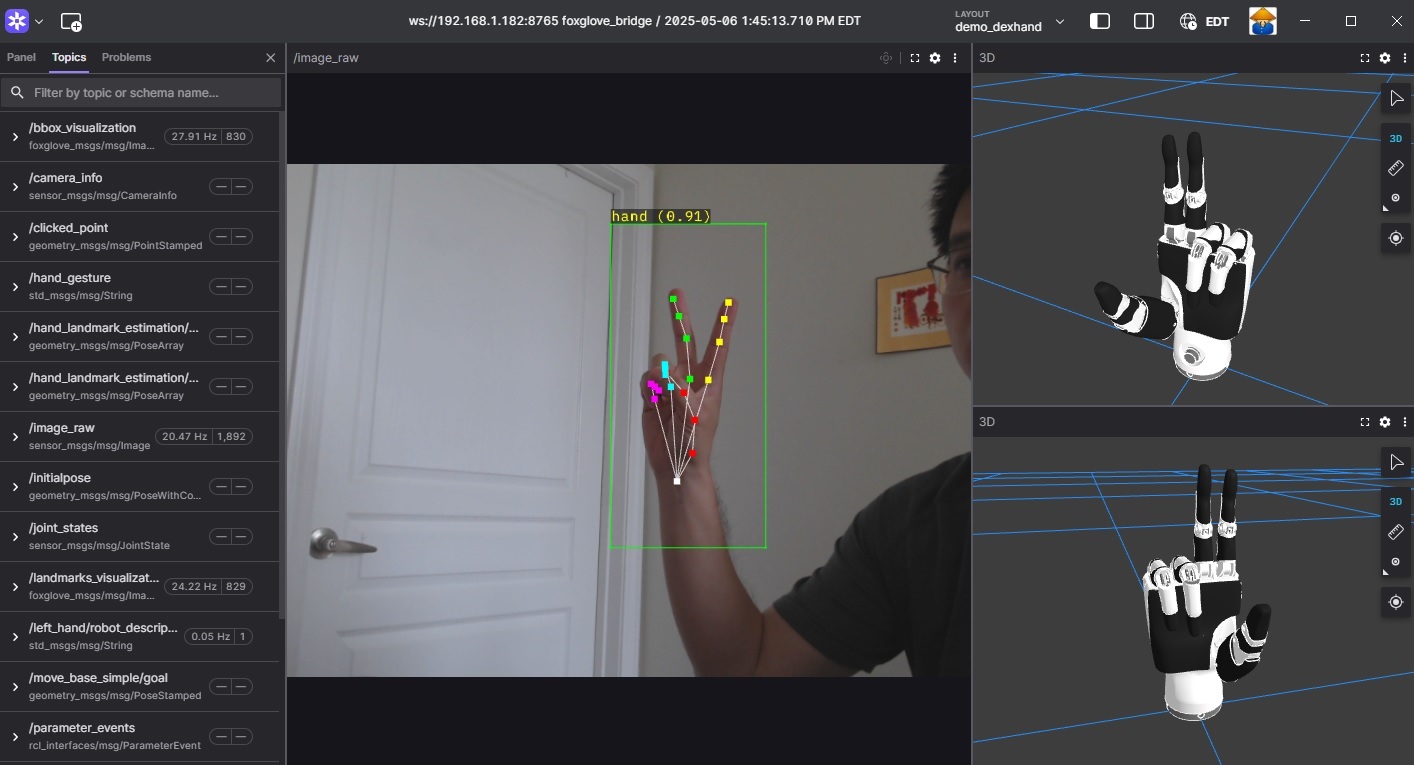
The renesas_demo_dexhand package demonstrates dexterous hand control driven by vision. A USB
camera watches the operator’s hand, the rcar_pose_estimation YOLOX-to-MediaPipe cascade
extracts 21 hand landmarks, and both a virtual and a physical dexterous hand mirror the motion.
The demo provides:
Hand landmark estimation and interpretation on the R-Car V4H SH.
Simultaneous control of virtual and physical dexterous hands.
Support for the Inspire RH56, Inspire RH56E2, and Ruiyan RH2 hands.
Visualization through Foxglove Studio.
Note
The demo runs without any physical hand. Pass use_mock_hardware:=true to drive the virtual
hand only, and watch it in Foxglove.
Hardware Setup
Complete the Prerequisites for Running Sample Applications.
Connect a compatible USB camera to the R-Car V4H SH board for hand detection and landmark estimation.
Optional: Connect the dexterous hand to the R-Car V4H SH board to control the physical hand.
Note
Before using the Ruiyan RH2 hand, initialize it with the setup script in
ruiyan_rh2_hand_bringup/setup/ruiyan_rh2_init.sh, or ininstall/ruiyan_rh2_hand_bringup/share/ruiyan_rh2_hand_bringup/setup/ruiyan_rh2_init.shafter installation.
Quick Software Setup Instructions
Note
Run every command below inside the cross-compilation Docker container set up in Prerequisites for Running Sample Applications.
Get the
ros2_demo_workspacerepository, which carries the manifest for each demo:cd ~/ros2_ws git clone https://github.com/renesas-rdk/ros2_demo_workspace.git
Import the repositories this demo needs with the
vcstool:vcs import < ./ros2_demo_workspace/vcs_manifests/rcar-v4h/vision_based_dexterous_hand.target.lock.repos
Every repository the demo needs is cloned into the
src/folder of the workspace, each pinned to the revision the manifest locks.Install the demo’s build dependencies into the target sysroot:
arm64-chroot apt update
sysroot-rosdep-install
Cross-compile the workspace:
cross-colcon-build --packages-up-to renesas_demo_dexhand
Deploy the result to the board and install the runtime dependencies there, as described in Deploying and Installing Dependencies.
Running the Demo
The launch arguments are the same for every hand.
To launch the virtual hand demo:
# Inspire RH56 hand
ros2 launch renesas_demo_dexhand demo_inspire_rh56_hand_rcar.launch.py use_mock_hardware:=true

# Inspire RH56E2 hand
ros2 launch renesas_demo_dexhand demo_inspire_rh56e2_hand_rcar.launch.py use_mock_hardware:=true

# Ruiyan RH2 hand
ros2 launch renesas_demo_dexhand demo_ruiyan_rh2_hand_rcar.launch.py use_mock_hardware:=true
To launch the physical Inspire RH56 or RH56E2 hand, which connect through a USB-to-serial adapter:
ros2 launch renesas_demo_dexhand demo_inspire_rh56_hand_rcar.launch.py \
  use_mock_hardware:=false video_device:=/dev/video0 serial_port:=/dev/ttyUSB0
To launch the physical Ruiyan RH2 hand, which connects through a USB-to-CAN adapter:
ros2 launch renesas_demo_dexhand demo_ruiyan_rh2_hand_rcar.launch.py \
  use_mock_hardware:=false video_device:=/dev/video0 can_interface:=can2
Note
can2 is the interface the USB-to-CAN adapter enumerates as, not the onboard CAN-FD header
of the board. Run ip link show | grep can with the adapter plugged in to confirm the name,
and pass it as can_interface.
Demo Operation
Hold your hand in front of the camera. The dexterous hand mimics your hand movements. The node
publishes the landmarks under the /pose_estimation/ namespace, which the bundled Foxglove
layouts subscribe to.
Launch Arguments
The following table lists the launch arguments:
Argument |
Default |
Description |
|---|---|---|
|
|
Camera device used for hand tracking. |
|
|
Run against a simulated hand instead of physical hardware. The two Inspire launch files
default to |
|
|
USB-to-serial adapter of the physical Inspire RH56 or RH56E2 hand. |
|
|
Interface of the USB-to-CAN adapter of the physical Ruiyan RH2 hand. |
|
|
Target motor speed for all joints. The Inspire hardware interface accepts 0 to 1000 and clamps anything outside it; the Ruiyan RH2 interface accepts 0 to 5000 and falls back to 1000 if the value is out of range. |
|
|
Which hand to control, |
Replaying Fixed Gestures
The gesture_to_* launch files replay predefined gestures to the hand without any perception,
which is a quick way to verify the hand hardware on its own:
ros2 launch renesas_demo_dexhand gesture_to_inspire_rh56_hand.launch.py
ros2 launch renesas_demo_dexhand gesture_to_inspire_rh56e2_hand.launch.py
ros2 launch renesas_demo_dexhand gesture_to_ruiyan_rh2_hand.launch.py
See also
Dexterous Hand with Tactile Sensors extends this demo with a second camera, the Renesas SSC tactile glove, and object-aware grip control.