Application Development with R-Car V4H SH
This section describes the development of ROS 2 applications for the Renesas R-Car V4H SH board.
The target platform is ROS 2 Jazzy running on Ubuntu 24.04 LTS on the R-Car V4H SH.
When developing ROS 2 applications for the Renesas R-Car V4H SH platform, it is essential to set up the development environment correctly.
This guide helps you get started with ROS 2 development, including setting up the necessary tools, cross-building applications, and deploying them to the R-Car V4H SH board.
The following topics are covered in this section:
Development Guide: Setup, cross-build, debug, and deployment of applications on the R-Car V4H SH platform.
Model Zoo: AI model packages optimized with CNN-IP acceleration for the R-Car V4H SH architecture.
Sample Applications: Examples of ROS 2 applications demonstrating various functionalities and use cases.
Other Concepts: Additional concepts relevant to R-Car V4H SH ROS 2 development.
The following figure shows the overall workflow covered in this chapter, from setting up the cross-build environment on the host PC to running, debugging, and visualizing an application on the board:
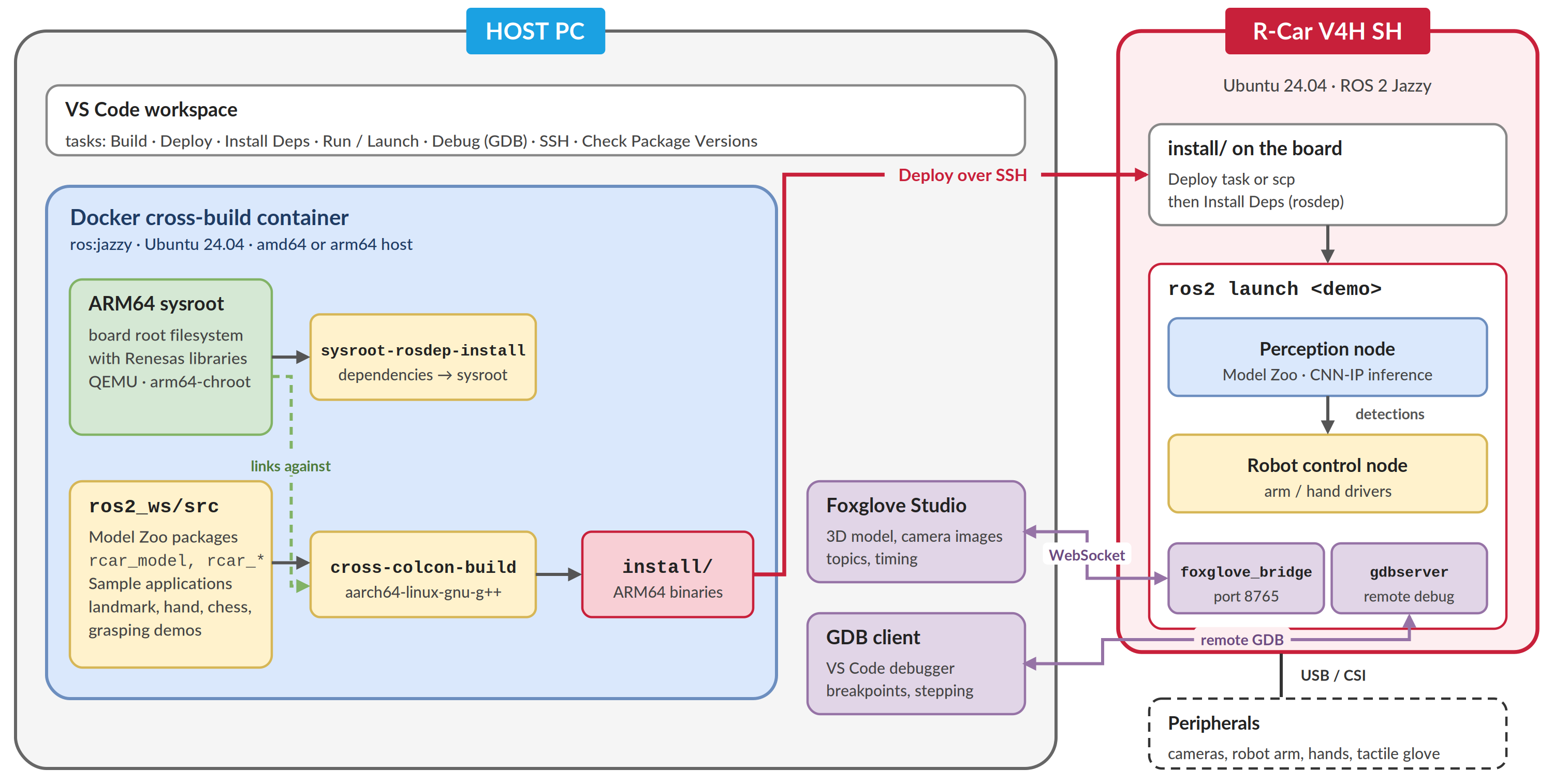
Application development workflow overview
Application Development
- Application Development Guide
- Cross-compilation Overview
- Cross-compilation Environment Setup
- Cross-compilation Usage Guide
- ROS 2 VS Code Workspace Configuration
- ROS 2 Application Deployment
- ROS 2 Application Remote Debugging
- Cross-build Non-ROS 2 Applications
- Known Issue: Non-Relocatable Sysroot CMake Paths
- Cross-compilation FAQ
- Model Zoo
- Sample Applications
- Other Concepts