Dexterous Hand with Tactile Sensors
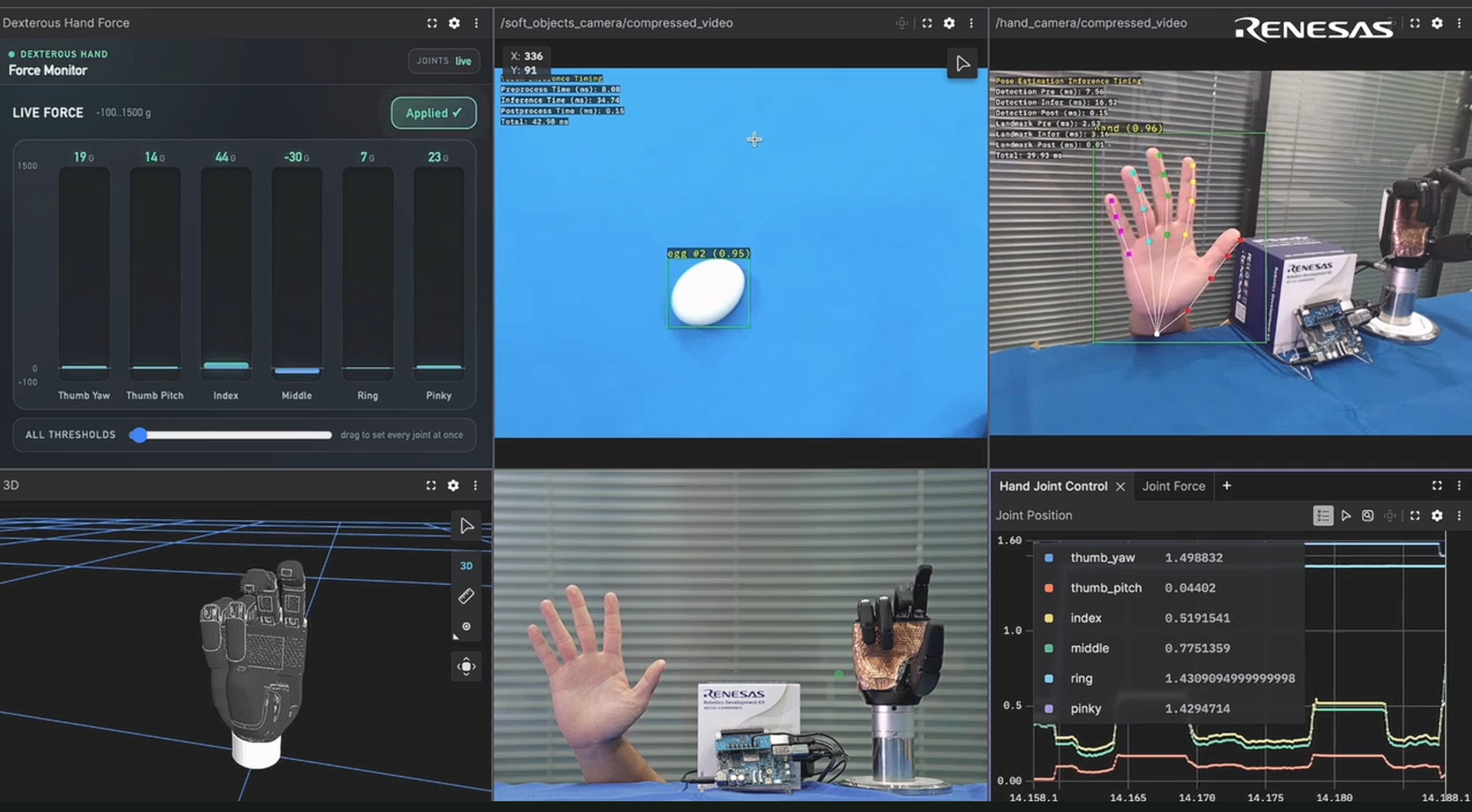
Dexterous Hand Demo with Tactile Sensors
renesas_demo_dexhand_w_sensors extends the Vision-Based Dexterous Hand demo with a second camera, the Renesas SSC tactile glove, and grip control that adapts to what the hand is about to pick up.
The demo wires together:
The
dexhand_tri_cascadeperception node, provided byrenesas_demo_dexhand_w_sensors, which runs three Model Zoo models at once.Inspire RH56E2 hand and SSC tactile glove bringup.
Hand-landmark gripper teleoperation: your hand drives the gripper opening.
Object-aware force-threshold and gripper-profile updates, so a sponge is gripped differently from an egg.
Tactile human-touch gesture detection from the glove.
Foxglove layouts and a companion panel extension.
Perception: One Node, Three Models
On the R-Car V4H SH all three models run inside the single dexhand_tri_cascade node, from one
exec_config.json, with one lane per model:
Stage |
Role |
|---|---|
YOLOX hand detection |
Finds the operator’s hand in the hand-camera frame. |
MediaPipe hand landmarks |
Produces the 21 keypoints from the detected hand crop. |
YOLOX soft-object detection |
Classifies the object in the second camera’s frame. |
They cannot be split across separate nodes, because the graph context of rcar_model is
process-global. See
The rcar_model Framework for the underlying constraint.
The node publishes the same PoseArray wire format and topic names as the equivalent
multi-node setup, so the rest of the graph is unchanged.
Helper Nodes
The following table lists the helper nodes the demo runs alongside the perception node:
Executable |
Role |
|---|---|
|
Decodes the soft-object detections, picks the highest-confidence class above
|
|
Decodes the same detections and publishes a grasp-profile name ( |
|
Republishes an image stream at a capped frame rate, with explicit input and output QoS. |
Force-threshold presets live in config/hand/object_force_thresholds.yaml. The class keys must
match the names of the yolox_soft model: carrot, coke, egg, pp_cup, and
sponge.
The setter nodes behave as follows:
Detections below
min_confidenceare ignored.The highest-confidence remaining detection is treated as the dominant class.
An empty detection frame keeps the last applied threshold and mapping.
Unknown classes fall back to the configured defaults.
Force thresholds are clamped to 0 to 3000 grams per joint.
Repeated identical classes and mapping filenames are deduplicated.
Hardware Setup
The demo uses the following hardware:
Item |
Purpose |
|---|---|
Inspire RH56E2 dexterous hand |
The controlled hand. Connects through a USB-to-serial adapter, |
Renesas SSC tactile glove |
Per-pad contact sensing, based on the RAA2S470X impedance sensor. Connects over SPI or serial. |
USB camera 1 (hand camera) |
Watches the operator’s hand for landmark estimation. |
USB camera 2 (soft-object camera) |
Watches the object to be grasped. |
Important
Both cameras run through usb_cam with MJPEG decoding, because two uncompressed 640x480
YUYV streams do not fit on a single USB 2.0 root hub. Plug the two cameras into ports on
different root hubs if you see dropped frames.
Complete the Prerequisites for Running Sample Applications first. Note the device node of each camera; the launch files take them as separate arguments.
Quick Software Setup Instructions
Note
Run every command below inside the cross-compilation Docker container set up in Prerequisites for Running Sample Applications.
Get the
ros2_demo_workspacerepository, which carries the manifest for each demo:cd ~/ros2_ws git clone https://github.com/renesas-rdk/ros2_demo_workspace.git
Import the repositories this demo needs with the
vcstool:vcs import < ./ros2_demo_workspace/vcs_manifests/rcar-v4h/vision_based_dexterous_hand_with_sensors.target.lock.repos
Every repository the demo needs is cloned into the
src/folder of the workspace, each pinned to the revision the manifest locks.Install the demo’s build dependencies into the target sysroot:
arm64-chroot apt update
sysroot-rosdep-install
Cross-compile the workspace:
cross-colcon-build --packages-up-to renesas_demo_dexhand_w_sensors
Deploy the result to the board and install the runtime dependencies there, as described in Deploying and Installing Dependencies.
Running the Demo
Source the workspace first:
source /opt/ros/jazzy/setup.bash
source install/setup.bash
Full Integrated Demo
Runs everything together: tri-cascade perception, hand and glove bringup, gripper teleoperation, object-aware force thresholds, tactile gestures, and the Foxglove overlays.
ros2 launch renesas_demo_dexhand_w_sensors integrated_rcar_demo.launch.py \
  hand_video_device:=/dev/video0 \
  soft_objects_video_device:=/dev/video2
The launch defaults to the real hand and the real glove. To run the same graph fully mocked, override both flags:
ros2 launch renesas_demo_dexhand_w_sensors integrated_rcar_demo.launch.py \
  hand_use_mock_hardware:=true \
  glove_use_mock_hardware:=true
Perception Only
Brings up the two cameras, the tri-cascade node, and the object-aware setter nodes, with its own
foxglove_bridge. Neither the hand nor the glove is started.
ros2 launch renesas_demo_dexhand_w_sensors dual_camera_tri_model_rcar_demo.launch.py \
  hand_video_device:=/dev/video0 \
  soft_objects_video_device:=/dev/video2
Tactile Gestures Only
Runs the glove and the human-touch gesture detector. The default uses a real glove and a mocked hand, which is useful for exercising gesture detection without moving the physical hand.
ros2 launch renesas_demo_dexhand_w_sensors human_touch_gestures_demo.launch.py
Watch the gesture stream:
ros2 topic echo /tactile_gestures/event
With the glove mocked, you can drive fake contact bits by hand. The order is thumb, index, middle, ring, pinky, palm:
# Press the palm pad
ros2 topic pub --rate 50 /fake_tactile_glove_contact std_msgs/msg/Float64MultiArray \
  "{data: [0,0,0,0,0,1]}"

# Release everything
ros2 topic pub --once /fake_tactile_glove_contact std_msgs/msg/Float64MultiArray \
  "{data: [0,0,0,0,0,0]}"
Set feedback_enabled:=false to keep gesture detection running without the hand-motion
feedback.
Common Launch Arguments
The following table lists the launch arguments shared by the launch files above:
Argument |
Meaning |
|---|---|
|
Camera device nodes for the hand camera and the soft-object camera. |
|
Shared fallback for both the hand and the glove mock modes. |
|
Per-component overrides. An empty value falls back to |
|
|
|
Hand motor speed, available in the integrated launches. |
|
USB-to-serial adapter of the Inspire RH56E2 hand. |
|
|
|
Calibration YAML from |
|
Multi-profile gripper-to-joint mapping YAML holding all grasp profiles. |
|
Key in |
|
Frame-rate cap on the soft-object branch before the models and the Foxglove display. |
Visualization
The demos start foxglove_bridge on the board by default. Connect Foxglove Studio to:
ws://<board-ip>:8765
The shipped layout config/foxglove/integrated_rcar_demo.json subscribes to the usb_cam
/compressed topics. Pointing panels at the full-rate raw camera topics instead increases CPU
and network load on the board noticeably.
Install the Companion Panel Extension
The layouts use custom panels for the hand controls, the tactile pads, the gripper, and the force thresholds. Install them once:
Open Foxglove Studio Desktop.
Go to Settings > Extensions > Install from file.
Select
config/foxglove/renesasuxsst.foxglove-dexhand-panels-1.0.0.foxe.Restart Foxglove Studio, or reload the panel registry.
See also
Foxglove Visualization for the general Foxglove setup.