Rock-Paper-Scissors
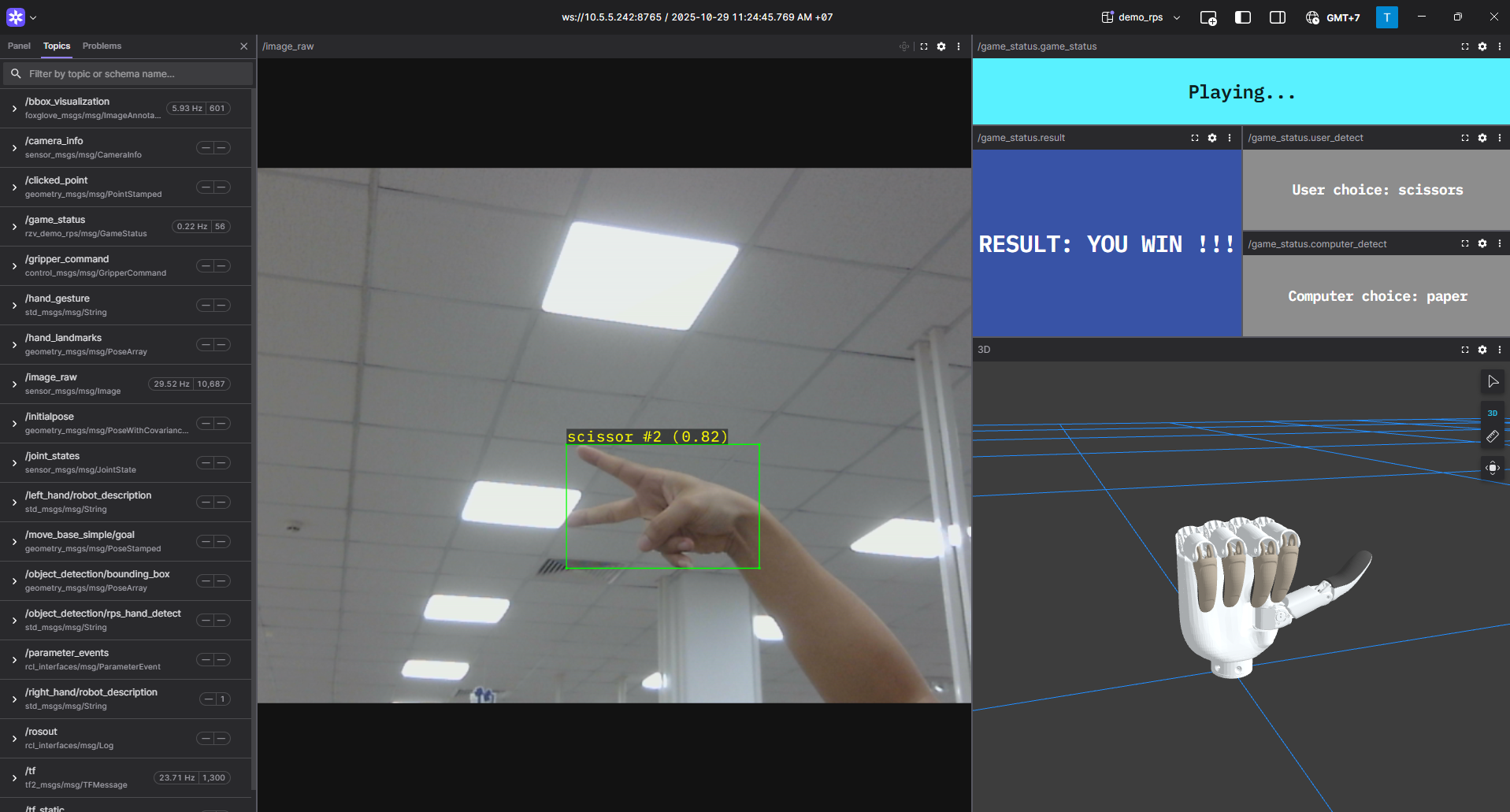
Rock Paper Scissors Demo
The renesas_demo_rps package plays rock-paper-scissors against a human. A USB camera watches
the player’s hand, the rcar_object_detection detector classifies the gesture, and the game
logic drives a dexterous hand through the round.
The demo provides:
Rock-paper-scissors gesture detection and interpretation on the R-Car V4H SH.
Simultaneous control of virtual and physical dexterous hands.
Support for the Inspire RH56, Inspire RH56E2, and Ruiyan RH2 hands.
Visualization through Foxglove Studio.
Game Play
The player starts a game by showing the HI pose, a scissors gesture, in front of the camera.
The robotic hand performs a 1-2-3 countdown to signal the start of the round.
When the countdown finishes, the player must show their gesture (rock, paper, or scissors) within 2 seconds. If no gesture is detected in that window, the game is aborted.
Once the player has chosen, the robotic hand randomly selects and displays rock, paper, or scissors.
The hand then reports the result with a gesture:
OKfor a draw,Victorywhen you lose, andThumbs Upwhen you win.Two seconds after the result is shown, a new game can start.
Nodes
rps_controller subscribes to the string-based gesture topic, runs the game logic, and
commands the robotic hand. The node itself is platform-neutral. The following table lists its
interfaces:
Interface |
Type |
Description |
|---|---|---|
|
sub, |
Receives the detected gesture: |
|
action client, |
Sends a goal containing the gesture name so the hand performs the matching pose. |
Hardware Setup
Complete the Prerequisites for Running Sample Applications.
Connect a USB camera to the R-Car V4H SH board for gesture detection.
Optional: Connect an Inspire RH56, Inspire RH56E2, or Ruiyan RH2 hand for the physical demo. The Inspire hands attach through a USB-to-serial adapter, the Ruiyan RH2 through a USB-to-CAN adapter.
Quick Software Setup Instructions
Note
Run every command below inside the cross-compilation Docker container set up in Prerequisites for Running Sample Applications.
Get the
ros2_demo_workspacerepository, which carries the manifest for each demo:cd ~/ros2_ws git clone https://github.com/renesas-rdk/ros2_demo_workspace.git
Import the repositories this demo needs with the
vcstool:vcs import < ./ros2_demo_workspace/vcs_manifests/rcar-v4h/rock_paper_scissors.target.lock.repos
Every repository the demo needs is cloned into the
src/folder of the workspace, each pinned to the revision the manifest locks.Install the demo’s build dependencies into the target sysroot:
arm64-chroot apt update
sysroot-rosdep-install
Cross-compile the workspace:
cross-colcon-build --packages-up-to renesas_demo_rps
Deploy the result to the board and install the runtime dependencies there, as described in Deploying and Installing Dependencies.
Running the Demo
Launch the demo for the hand you have connected:
# Inspire RH56 hand
ros2 launch renesas_demo_rps demo_inspire_rh56_hand_rps_rcar.launch.py

# Inspire RH56E2 hand
ros2 launch renesas_demo_rps demo_inspire_rh56e2_hand_rps_rcar.launch.py

# Ruiyan RH2 hand
ros2 launch renesas_demo_rps demo_ruiyan_rh2_hand_rps_rcar.launch.py
Each demo also has a low-latency always-win variant, in which the controller responds immediately with the gesture that beats the detected player pose instead of choosing at random:
ros2 launch renesas_demo_rps demo_inspire_rh56_hand_rps_always_win_rcar.launch.py
ros2 launch renesas_demo_rps demo_inspire_rh56e2_hand_rps_always_win_rcar.launch.py
ros2 launch renesas_demo_rps demo_ruiyan_rh2_hand_rps_always_win_rcar.launch.py
In this mode the controller publishes ALWAYS_WIN on /game_status, and
config/foxglove/demo_rps_always_win.json provides a matching Foxglove layout for inspecting
detection, inference timing, game status, hand commands, and the hand visualization.
Launch Arguments
The launch files take the same camera, hand, and mock-hardware arguments as the Vision-Based Dexterous Hand demo.
The three plain demo_*_rps_rcar.launch.py files declare no additional arguments. Their
perception stage is hard-wired to the yolov8_rps_detection executable with
model_type: yolov8_rps.
For example, to run the physical Inspire RH56E2 hand:
ros2 launch renesas_demo_rps demo_inspire_rh56e2_hand_rps_rcar.launch.py \
  use_mock_hardware:=false video_device:=/dev/video0 serial_port:=/dev/ttyUSB0
The *_always_win_rcar.launch.py variants add one argument of their own:
Argument |
Default |
Description |
|---|---|---|
|
|
Selects the detector at launch time: |
ros2 launch renesas_demo_rps demo_inspire_rh56e2_hand_rps_always_win_rcar.launch.py \
  use_mock_hardware:=false video_device:=/dev/video0 serial_port:=/dev/ttyUSB0 detector:=yolox