Static / Camera-based Hand Landmark Estimation
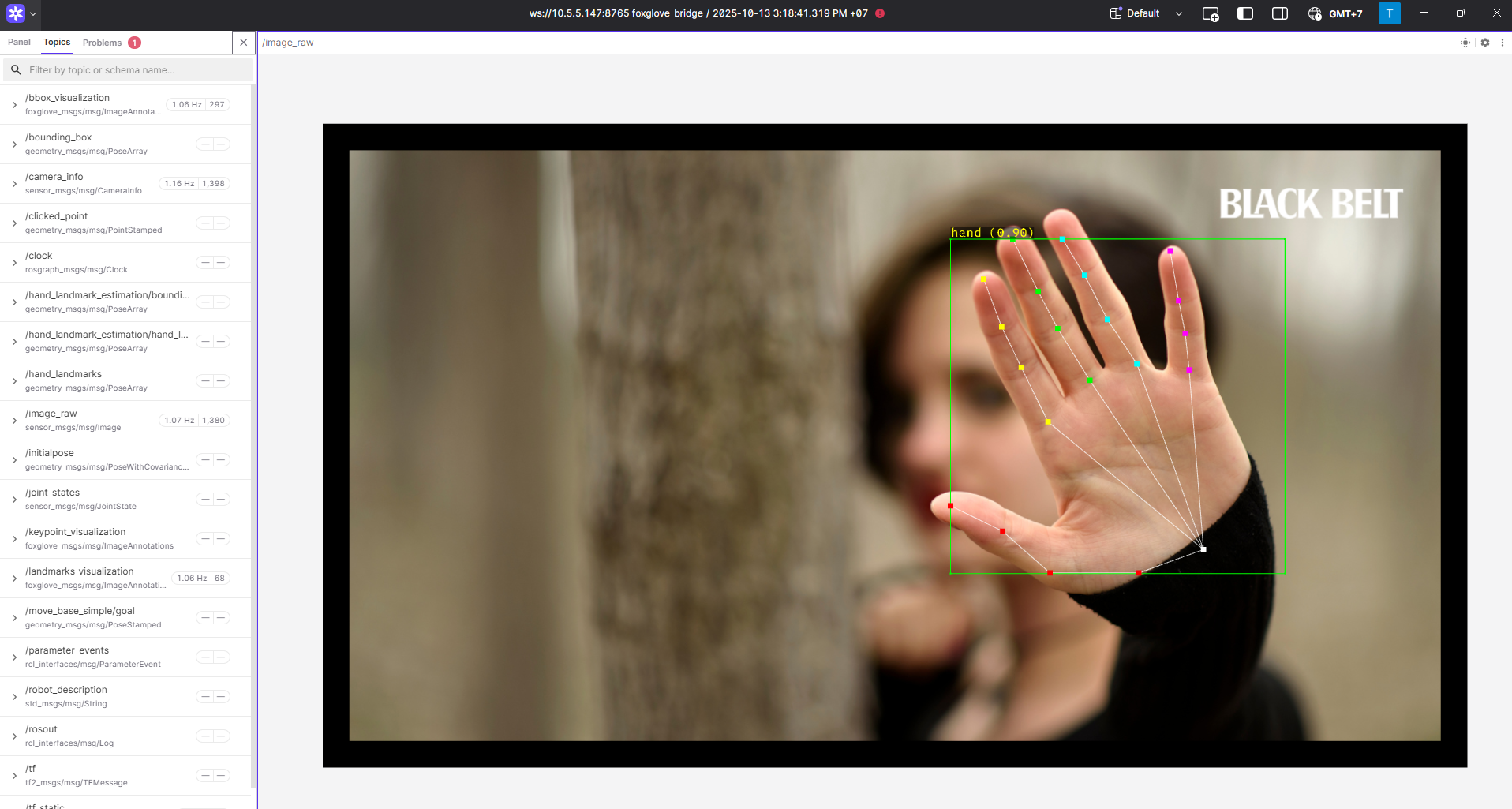
Hand Landmark Demo
The rcar_pose_estimation package detects hands in an image and estimates 21 landmarks on each one. It runs on its own, without a robot, and is the perception stage that the Vision-Based Dexterous Hand demo is built on.
The package provides:
Hand detection and landmark estimation on the R-Car V4H SH, wrapped in a ROS 2 node that drives the rcar_model graph runtime.
A two-stage pipeline, with two cascades to choose from:
A YOLOX hand detector followed by the MediaPipe hand landmark model.
The MediaPipe palm detector followed by the MediaPipe hand landmark model.
Estimation on a static image or on a live camera stream.
Landmark smoothing across frames with an exponential moving average (EMA).
Per-stage inference timing, overlaid on the image.
Visualization through Foxglove Studio.
Both stages of a cascade run inside one graph in one process, as two parallel workers. The
compiled models for both cascades ship with the package under config/models/. See
Pose Estimation Application for the topics, the node parameters, and
the models.
Hardware Setup
Complete the Prerequisites for Running Sample Applications.
Optional: Connect a USB camera to the R-Car V4H SH board for camera-based estimation. The static image launch files do not need one.
Quick Software Setup Instructions
Note
Run every command below inside the cross-compilation Docker container set up in Prerequisites for Running Sample Applications.
Get the
ros2_demo_workspacerepository, which carries the manifest for each demo:cd ~/ros2_ws git clone https://github.com/renesas-rdk/ros2_demo_workspace.git
Import the repositories this demo needs with the
vcstool:vcs import < ./ros2_demo_workspace/vcs_manifests/rcar-v4h/hand_landmark_estimation.target.lock.repos
Every repository the demo needs is cloned into the
src/folder of the workspace, each pinned to the revision the manifest locks.Install the demo’s build dependencies into the target sysroot:
arm64-chroot apt update
sysroot-rosdep-install
The first run takes a while.
Cross-compile the workspace:
cross-colcon-build --packages-up-to rcar_pose_estimation
Deploy the result to the board and install the runtime dependencies there, as described in Deploying and Installing Dependencies.
Running the Demo
Load the workspace environment on the R-Car V4H SH board:
cd /home/ubuntu/ros2_ws
source /opt/ros/jazzy/setup.bash
source ./install/setup.bash
Launch one cascade, on a static image or on the camera.
For hand landmark estimation on the bundled
config/test/hand.jpgimage, use:# YOLOX hand detector to MediaPipe landmark ros2 launch rcar_pose_estimation static_yolox_mediapipe.launch.py # MediaPipe palm detector to MediaPipe landmark ros2 launch rcar_pose_estimation static_mediapipe_cascade.launch.py
For hand landmark estimation on the camera input, use:
# YOLOX hand detector to MediaPipe landmark
ros2 launch rcar_pose_estimation camera_yolox_mediapipe.launch.py video_device:=/dev/video0

# MediaPipe palm detector to MediaPipe landmark
ros2 launch rcar_pose_estimation camera_mediapipe_cascade.launch.py video_device:=/dev/video0
video_devicedefaults to/dev/video0. Runls /dev/video*to find your camera, and pass its node if it enumerates under another number.The camera launch files set
TVM_NUM_THREADS=1. Inference runs on the accelerator, so extra TVM worker threads only busy-wait on CPU cores.Each launch file starts the image source, the cascade node, the bounding-box and hand-skeleton visualizers, one timing overlay per stage, and a
foxglove_bridgeon port 8765.For visualization using Foxglove Studio, refer to the Foxglove Visualization section for setup instructions.
The package does not ship a Foxglove layout. Add an Image panel on
/image_rawand enable the following image annotation topics on it:Topic
Shows
/pose_estimation/bounding_box_visualizationThe detected hand bounding boxes.
/pose_estimation/hand_landmarks_visualizationThe 21-point hand skeleton.
/pose_estimation/inference_timing_yolox_visualizationor/pose_estimation/inference_timing_detector_visualizationThe detector timing, for the YOLOX or the MediaPipe palm-detector cascade.
/pose_estimation/inference_timing_mediapipe_visualizationThe landmark stage timing.
For more details about the Static / Camera-based Hand Landmark Estimation application, refer to Pose Estimation Application and to the README.md in the rcar_pose_estimation package.