Ubuntu System with RZ/V2H RDK
This section provides usage information about the interfaces available on the RZ/V2H RDK when running the Ubuntu system.
For more details about specification of each interface, refer to the RZ/V2H Group User’s Manual: Hardware.
Overview
The RZ/V2H RDK supports multiple peripheral interfaces that allow users to connect and control external devices for various robotic and industrial applications. These interfaces include:
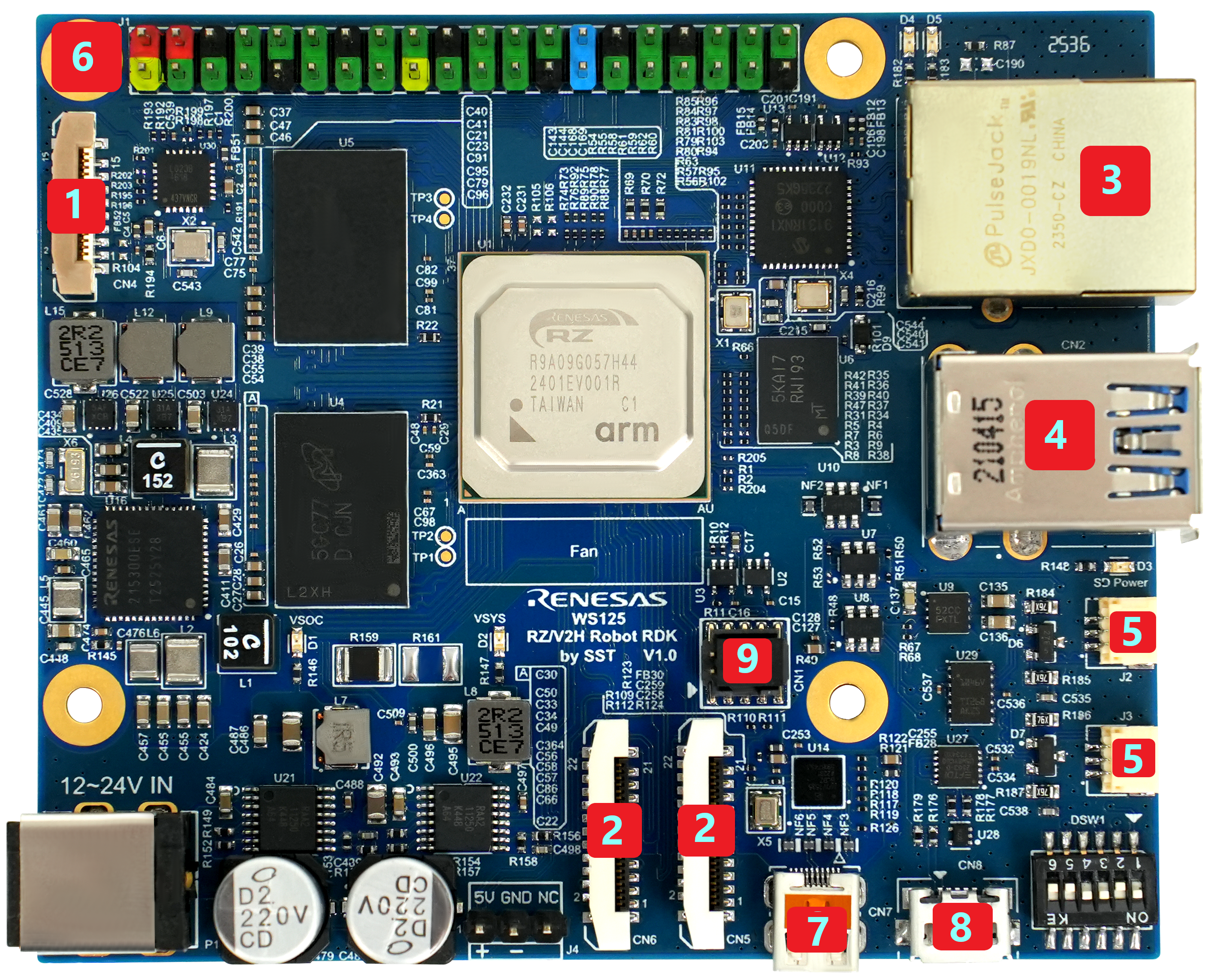
RZ/V2H Robotic Development Kit Interfaces
Main Interfaces
The main interfaces available on the RZ/V2H Robotic Development Kit are listed below.
No |
Interface Name |
Description |
|---|---|---|
1 |
PCIe 3.0 16-pin connector |
High-speed peripheral expansion interface. |
2 |
MIPI-CSI 22-pin connector x2 |
Dual camera input interface for image sensors. |
3 |
1000M RJ45 |
Gigabit Ethernet LAN port for network connectivity. |
4 |
USB 3.2 Type A x2 |
USB host ports for external devices such as mouse, keyboard, or USB camera. |
No |
Interface Name |
Description |
|---|---|---|
5 |
CAN-FD x2 |
Controller Area Network Flexible Data-Rate communication ports. |
6 |
RasPi GPIO 40-pin Header (I2C, SPI, UART, GPIO, PCM) |
General purpose I/O interface compatible with Raspberry Pi pin layout. |
No |
Interface Name |
Description |
|---|---|---|
7 |
Micro-HDMI |
Video output interface for external display. |
8 |
USB-UART |
Serial console interface for debugging. |
9 |
JTAG 10-pin |
JTAG interface for debugging and programming. |
Each subsection provides details on how to identify, configure, and access these interfaces within the Ubuntu environment.