Peripheral Interfaces
This section provides usage information about the interfaces available on the R-Car V4H SH when running the Ubuntu system.
For more details about specification of each interface, refer to the SparrowHawk-Hardware_user’s_manual_v015.pdf.
Overview
The R-Car V4H SH supports multiple peripheral interfaces that allow users to connect and control external devices for various robotic and industrial applications.
The following figure shows where each interface is located on the board:
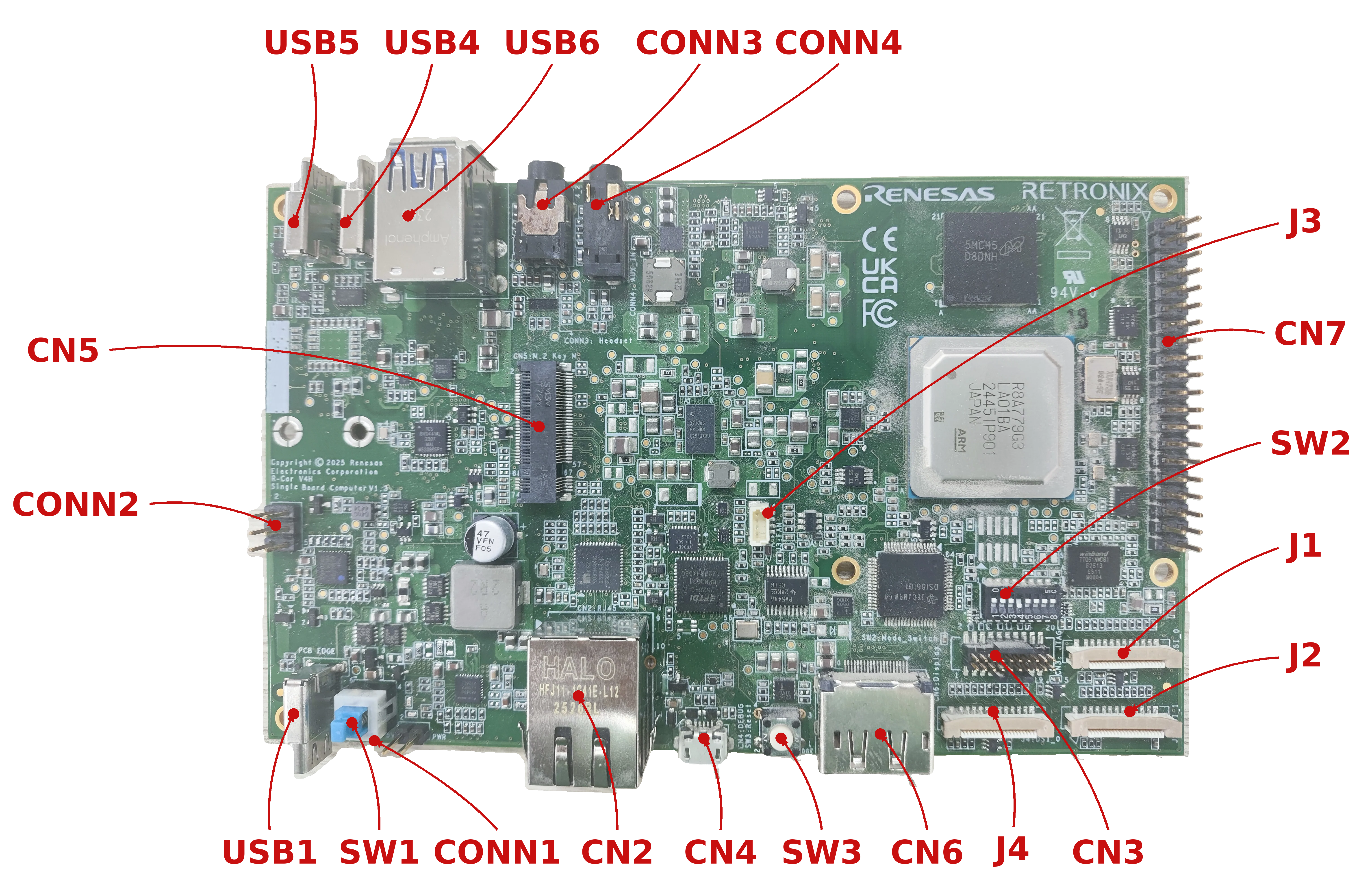
R-Car V4H Sparrow Hawk Hardware Interfaces
Main Interfaces
The main interfaces available on the R-Car V4H SH are listed below.
Interface |
Connector |
Description |
|---|---|---|
Camera I/F |
J1, J2 |
2x MIPI CSI camera |
Display |
CN6, J4 |
1x DP, 1x DSI |
Ethernet AVB |
CN2 |
1 port (1 Gbps) |
Debug Serial |
CN4 |
2 ports |
Audio |
CONN3, CONN4 |
In/Out, In |
PCIe 4.0 |
CN5 |
1x M.2 Key-M (x2 lane) |
USB 3.0 |
USB4, USB5, USB6 |
2x USB Type-A, 2x USB Type-C |
CAN-FD |
CONN2 |
2 ports |
PWM |
J3 |
1 port |
JTAG |
CN3 |
1 port |
Removable Media |
CN1 |
1x microSD |
Extensions |
CN7 |
Raspberry Pi® 40-pin GPIO header |
Mode Switches |
SW2 |
DIP switch |
Power |
USB1 (input) |
USB PD 20 V |
Power Control |
SW1, CONN1 |
ACC power switch (SW1) and the power-on jumper (CONN1). With CONN1 OPEN the board powers on only when SW1 is switched ON; with CONN1 SHORT the board powers on automatically as soon as a USB PD adapter is connected to USB1, and SW1 is bypassed. |
Reset |
SW3 |
Manual reset button. Resets the R-Car V4H SoC only; it does not cycle board power and does not reset external devices. |
Each subsection provides details on how to identify, configure, and access these interfaces within the Ubuntu environment.