Quick start guide for R-Car V4H SH
This guide provides step-by-step instructions for setting up the R-Car V4H Sparrow Hawk (SH) board and preparing the development environment.
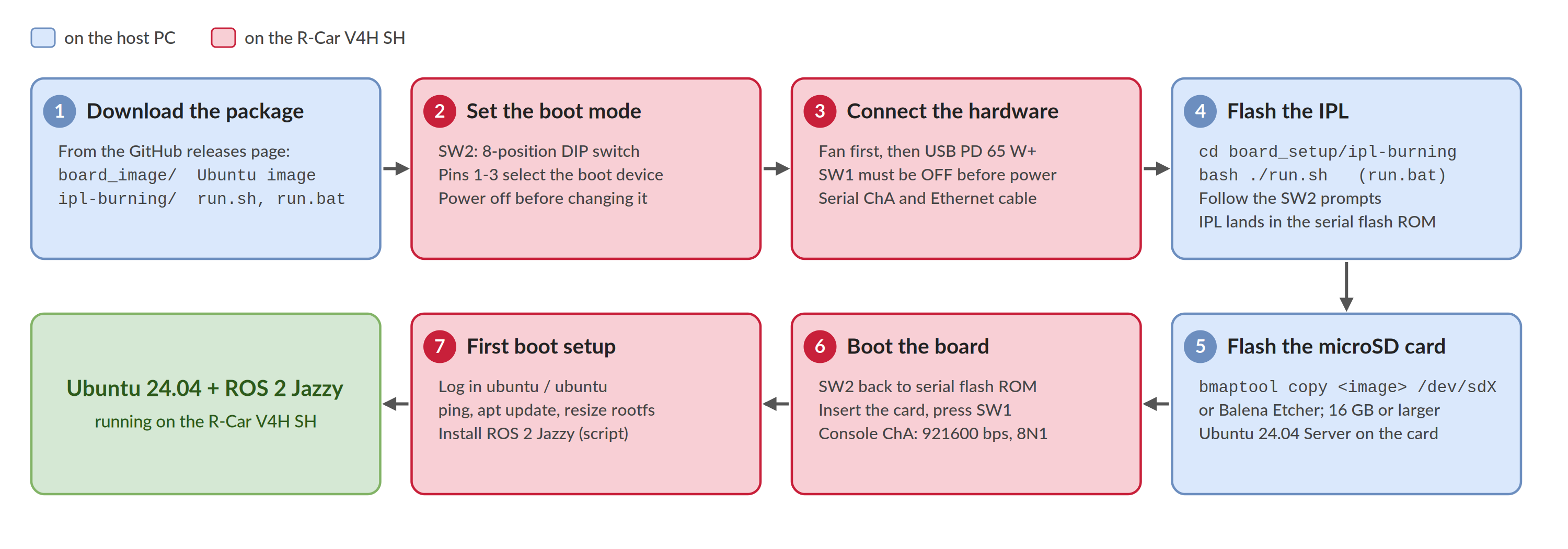
Follow the sections in order. Starting from a board straight out of the box, you will end up with Ubuntu 24.04 and ROS 2 Jazzy running on the R-Car V4H SH:
Section |
What you do |
|---|---|
Download and extract the software package that contains the |
|
Learn what each position of the Mode Switch (SW2) controls: boot device, master boot processor, and JTAG debugging function. |
|
Connect power, the serial console, and the network to the board. |
|
Write the Initial Program Loader to the board’s serial flash ROM using the
|
|
Flash the Ubuntu 24.04 Server image onto a microSD card with |
|
Boot the board for the first time and watch the boot log on the serial console. |
|
Log in, expand the root partition to the full microSD card, and install ROS 2 Jazzy. |
The following figure shows the same path, and where each step is carried out:
Quick start guide workflow overview